
Patient Portal Information
Welcome to our Patient Portal!
In order to authenticate each parent/guardian with each child in a safe and secure way, you will be provided a secure PIN for each child which will come under separate emails.
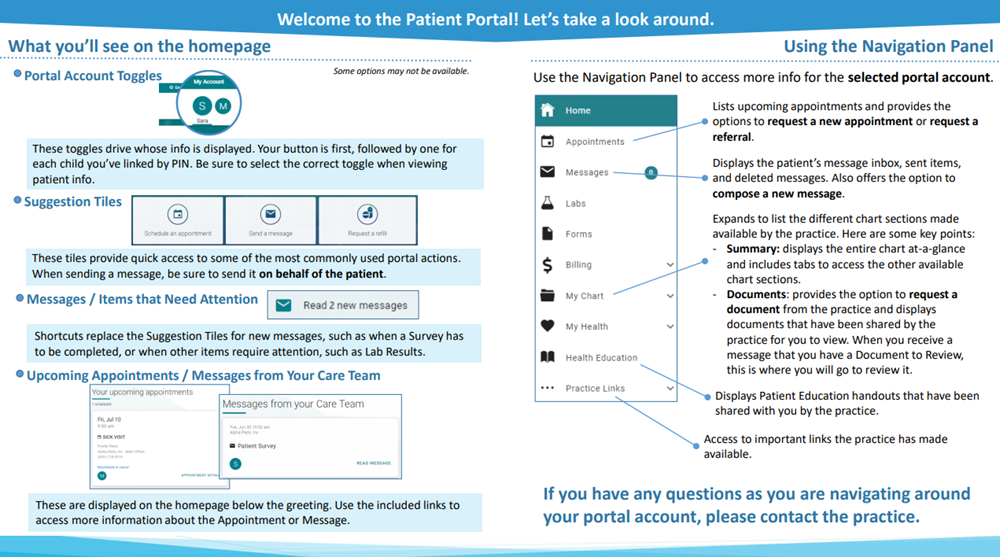
Once you are activated, here is a good reference on finding your way around:
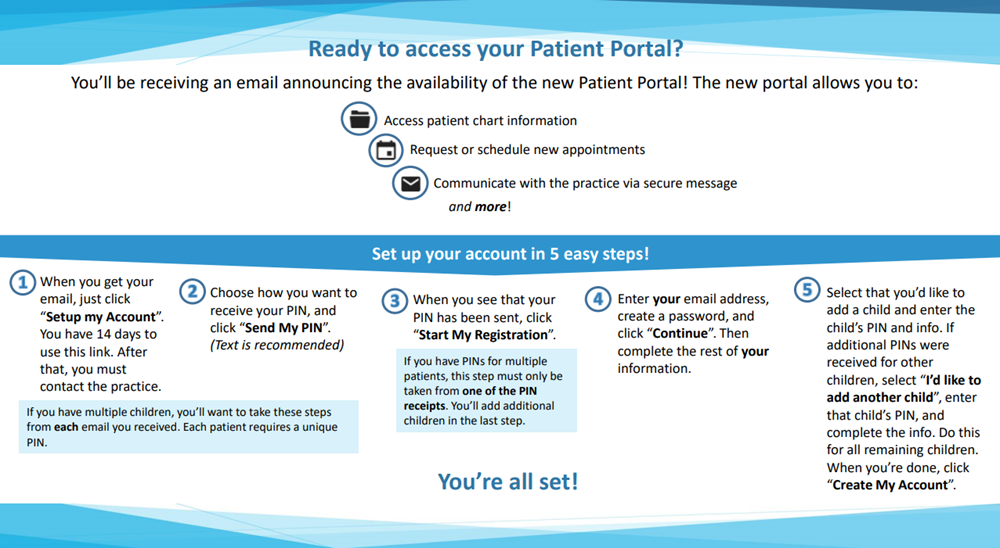
To register a patient for the portal:
- You will need the patient PIN number provided by the office via your Welcome Email.
- Parents will register themselves for the portal and then use the patient PIN provided to them to add each child to their account. Each child will receive their own PIN which will be unique to that child so access to one child's account will not gain access to any others. If you lose your PIN, please call the office.
- These PIN's are sent via an email from no-reply@ptportal.com. Many of our families are finding the email in their spam box. Please check your spam filter before calling the office to see if yours is stuck there.
- If your child is over 18, your child will need to set up their portal account and request to add a parent as a proxy account. You will not be able to have a portal account without your child having an account.
Helpful Portal Information
If you are having difficulty registering yourself or your child, please see the information below before calling the office.
- If you need help accessing forms in the new portal - Please Click Here
- If you need help accessing surveys in the new portal - Please Click Here
- If you need help adding another child to your account after you have established your account - Please Click Here
- How to add a Parent Proxy Account - Please Click Here
- If you registered with your information but used your child's name and need to change it to your name - Please Click Here